PHP API load testing
Write the load test for your REST API in the same language as the API. VoltTest gives you a PHP SDK for describing authenticated, chained request flows against JSON endpoints, and a Go engine that executes them at concurrency PHP could never generate on its own.
No JavaScript to learn, no XML to click through, no separate repository for performance tests. The test file lives next to your application code and runs locally or in the cloud without changing a line.
500 VUs free, no credit card
REST APIs fail differently than web pages
A page load is forgiving. It is one request, a human is waiting, and a slow response looks like a slow page. A REST endpoint is called in a loop by a mobile client, a partner integration and your own frontend at the same time, and the failure modes are structural rather than cosmetic.
The three that show up again and again in PHP APIs are an N+1 query that costs nothing at one request per second and saturates the database at two hundred, a connection pool that runs out before CPU does, and a queue that silently grows because jobs are enqueued faster than workers drain them. None of these appear in a unit test, and none appear when you click through the endpoint by hand. They appear under concurrency.
N+1 under concurrency
Fast in isolation, quadratic when two hundred users hit the same index route.
Connection pool exhaustion
Requests queue behind a pool limit long before CPU or memory look busy.
Queue backpressure
Jobs enqueue faster than workers drain, and latency drifts up over minutes.
A real authenticated flow, in PHP
Log in, keep the token, use it to write, then read the record back as the same user. Each virtual user runs this independently with its own token and its own row of data, which is what makes the numbers at the end mean something.
<?php
require __DIR__ . '/vendor/autoload.php';

use VoltTest\DataSourceConfiguration;
use VoltTest\VoltTest;

$test = new VoltTest('API Load Test');
$test->setVirtualUsers(200)->setDuration('5m')->setRampUp('30s');

$scenario = $test->scenario('Orders API');

// every virtual user takes one unique row from the CSV
$scenario->setDataSourceConfiguration(
    new DataSourceConfiguration(__DIR__ . '/users.csv', 'unique', true)
);

// 1. authenticate, keep the token per virtual user
$scenario->step('Login')
    ->post('https://api.example.com/login',
        '{"email":"${email}","password":"${password}"}')
    ->header('Content-Type', 'application/json')
    ->validateStatus('logged in', 200)
    ->extractFromJson('token', '$.data.access_token');

// 2. reuse it on an authenticated write
$scenario->step('Create order')
    ->post('https://api.example.com/orders', '{"sku":"${sku}"}')
    ->header('Authorization', 'Bearer ${token}')
    ->header('Content-Type', 'application/json')
    ->validateStatus('created', 201)
    ->extractFromJson('orderId', '$.data.id')
    ->setThinkTime('2s');

// 3. read it back as the same user
$scenario->step('Fetch order')
    ->get('https://api.example.com/orders/${orderId}')
    ->header('Authorization', 'Bearer ${token}')
    ->validateStatus('ok', 200);

$result = $test->run(true);
echo $result->getP95ResponseTime();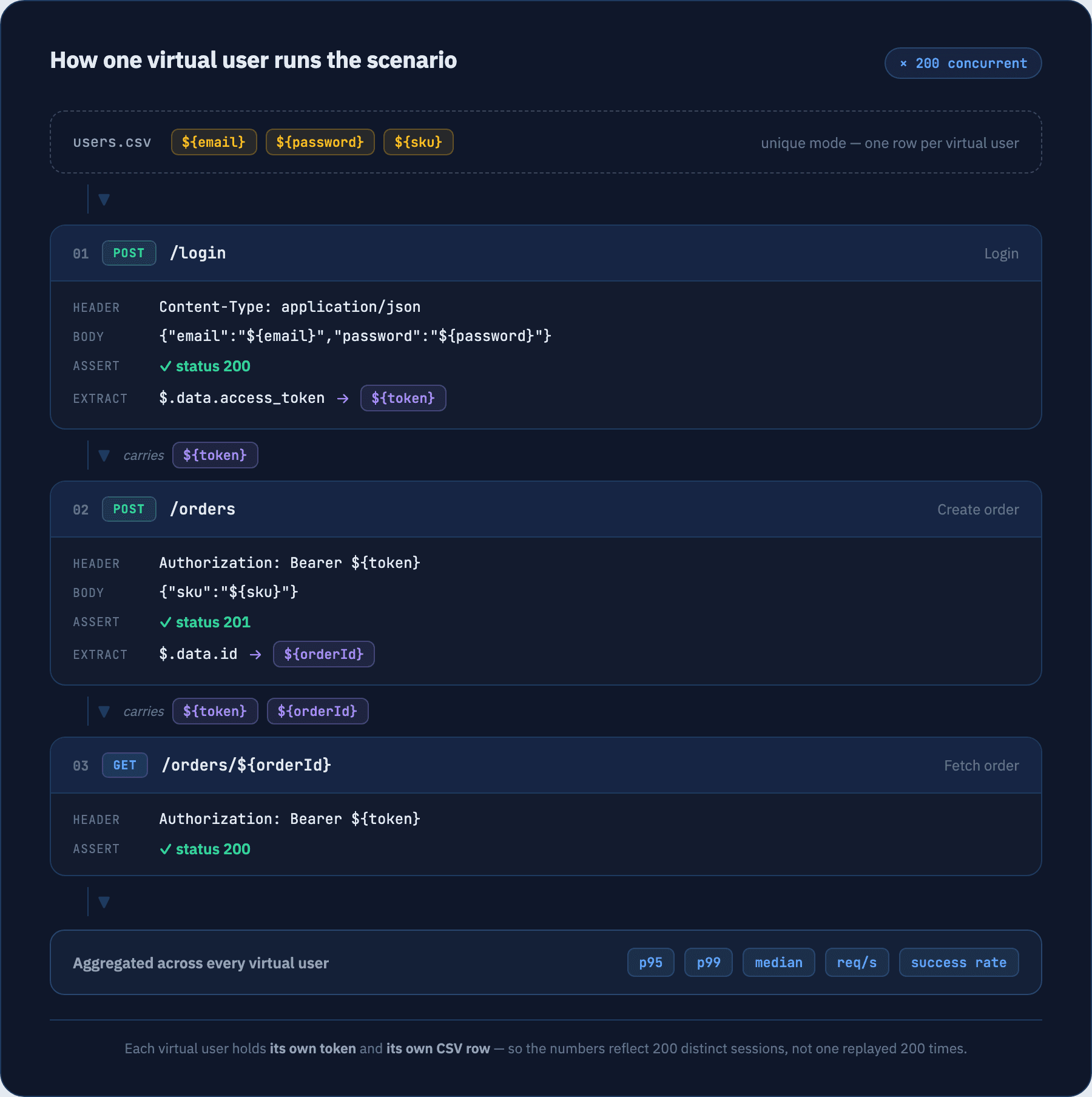
Two things to know
- A
Content-Typeheader is required on any step that sends a body — the SDK rejects the request without one rather than guessing. - URLs are absolute. There is no base-URL prefix applied to steps, so every request states the host it is going to.
How to run it
Three steps from an empty directory to a finished run. No agents to deploy, no controller to stand up, no YAML.
- 01
Install the SDK
One Composer package. It needs PHP 8.0 or newer with the json, curl and pcntl extensions — the Go engine binary is pulled in with it, so there is nothing else to install.
terminalcomposer require volt-test/php-sdk --dev - 02
Add the data file
The scenario above reads ${email}, ${password} and ${sku} from this CSV. The header row names the variables, and unique mode hands every virtual user its own row — so 200 virtual users need at least 200 rows.
users.csvemail,password,sku ada@example.com,s3cret,SKU-1001 grace@example.com,s3cret,SKU-1002 alan@example.com,s3cret,SKU-1003 - 03
Run it
Save the scenario as api-load-test.php next to users.csv and run it with plain PHP. Passing true to run() streams progress to the terminal while the test is in flight.
terminalphp api-load-test.php
When the run finishes, the summary prints straight to the terminal. Every figure in it is also readable off the returned result object, which is what makes it easy to assert on in CI.
Test Metrics Summary:
===================
Duration:     5m0.412s
Total Reqs:   84120
Success Rate: 99.87%
Req/sec:      280.40
Success Requests: 84011
Failed Requests: 109

Response Time:
------------
Min:    41.203ms
Max:    2.108s
Avg:    186.442ms
Median: 142.881ms
P95:    503.117ms
P99:    1.284s
Example output showing the shape of the summary. Your figures depend entirely on the API under test.
Running it from Laravel instead
In a Laravel project, install volt-test/laravel-performance-testing and the same scenario becomes an Artisan command — php artisan volttest:make OrdersApiTest to scaffold it, then php artisan volttest:run OrdersApiTest to execute. Add --cloud to run it on managed infrastructure instead of your laptop. Artisan command reference.
What you can express in a test
Enough to model how your API is actually called, without dropping into a second language to do it.
Every verb your API exposes
GET, POST, PUT, PATCH, DELETE, HEAD and OPTIONS, with arbitrary headers and a raw request body you control byte for byte. JSON goes out exactly as you wrote it — nothing re-serialises your payload behind your back.
Chained, stateful requests
Extract a value from a JSON response, a header, a cookie, a regex match or an HTML selector, then interpolate it into the next step's URL, body or headers with ${variable}. That is how a login-then-act flow stays realistic instead of hammering one endpoint.
A real session per virtual user
Turn on automatic cookie handling and every virtual user gets its own cookie store for the length of its scenario run. Sessions do not bleed between users, so session-store and cache contention show up the way they would in production.
Traffic mixes, not single endpoints
Define several scenarios and weight them so 70% of users browse while 30% write. Add think time at the scenario or the individual step level to model users who pause rather than looping as fast as the network allows.
Constant load or staged ramps
Hold a fixed number of virtual users for a duration with an optional ramp-up, or describe a staged profile that climbs, holds and drops to find the exact concurrency where latency breaks.
Data-driven runs from CSV
Feed a CSV to the scenario and hand rows out sequentially, randomly, or uniquely so no two virtual users share a record. Uniqueness is preserved across nodes in a distributed run.
Four REST API load tests worth writing first
If you only ever write four load tests for your API, write these.
Authenticated CRUD flow
Log in, capture the bearer token, create a record, read it back, update it, delete it. The most honest test of an API, because every step depends on the last one having actually worked.
Read-heavy list endpoints
Hammer paginated index and detail routes. This is where N+1 queries that are invisible at one request per second turn into a saturated connection pool at two hundred.
Write burst
Concentrate virtual users on a single POST route — order placement, signup, webhook intake — to see how write locks, unique constraints and queue depth behave when they all arrive at once.
Mixed weighted traffic
Run browse, search and checkout scenarios side by side with production-like weights. Endpoints that are fast in isolation often are not once they compete for the same database and cache.
What comes back
Every run returns aggregate metrics you can read in the terminal, in the dashboard, or from the result object in PHP.
p95 / p99 response time
the tail your users actually feel
Median and average
the typical request, not the outlier
Min / max response time
best case and worst case
Requests per second
sustained throughput under load
Success rate
share of requests that passed validation
Total / failed requests
raw volume and where it broke
Gate a build on the numbers
In a Laravel project, the VoltTest Laravel package adds PHPUnit assertions over the result — assert a p95 ceiling, a maximum error rate, or a minimum sustained requests-per-second, and fail the build when a change regresses the API. See the assertion reference.
These assertions ship with the Laravel package. Outside Laravel, read the same figures off the result object and assert on them yourself.
Keep reading
Steps — HTTP requests
Every verb, header, body and extractor available on a step.
JSON API examples
Complete auth, CRUD and token-extraction flows you can copy.
Laravel API testing
The same flows driven from Artisan in a Laravel project.
Load profiles
Constant load with a ramp-up, or a staged climb-hold-drop.
Scenarios
Weights, think time and per-scenario data sources.
Performance assertions
Fail a PHPUnit build when p95 or the error rate regresses.
Common questions
Does VoltTest only work with Laravel APIs?+
How do I load test endpoints that require authentication?+
How do I give each virtual user unique data, like a distinct email or record ID?+
Do I have to run tests in the cloud?+
What if my API is rate limited or sits behind a WAF?+
How many virtual users can I run for free?+
Written by Islam A-Elwafa, founder of VoltTest and author of the PHP SDK, the Laravel package and the Go engine · Last updated August 2026
Ready to push your limits?
Start with 500 VUs, real cloud infrastructure, and real metrics — no credit card required. Upgrade only when you outgrow it.
Free forever — 500 VUs, 10-minute runs, no credit card