E-commerce load testing
Rehearse the sale before it happens. Describe the spike you expect, send a realistic mix of browsers and buyers at your storefront, and find out where the funnel bends — while there is still time to fix it.
Ecommerce load testing written in PHP, pointed at any storefront that speaks HTTP — WooCommerce, Magento, Shopware or something you built yourself.
500 VUs free, no credit card
Sale traffic is a different shape
Ordinary load testing asks whether a system survives a steady stream of requests. Black Friday load testing asks something harder. Traffic arrives as a step change rather than a ramp, it is lopsided — most visitors browse and never buy — and it funnels a disproportionate share of that spike into the two slowest routes you own: add-to-cart and checkout.
Those routes also happen to be the ones sitting behind a rate limiter, a WAF and a payment provider. So e-commerce load testing is less about raw throughput and more about shape: the right curve, the right mix, and enough distinct shoppers that they are not all fighting over one account and one product row.
Stock contention
Everyone wants the same doorbuster. Row locks and stock decrements serialise, and the queue forms behind one product.
Cart writes, not page reads
A browse is cacheable. A cart mutation is not — every add-to-cart is a write that has to land.
Rejections that look like success
Rate limiters and WAFs answer with 4xx. Without an assertion those count as successful requests. See below.
Third parties in the path
The payment call leaves your infrastructure. Its latency under load is not something you control or should test live.
A real funnel, in PHP
Four stages describing the shape of the sale, then two weighted scenarios: seventy per cent who only look, thirty per cent who sign in, fill a cart and check out. Every step carries an expected status — the next section explains why that is not optional.
<?php
require __DIR__ . '/vendor/autoload.php';

use VoltTest\DataSourceConfiguration;
use VoltTest\VoltTest;

$test = new VoltTest('Flash sale rehearsal');

// the shape of the sale: warm up, drop, hold, drain
$test->stage('2m', 200)   // ramp 0 -> 200
     ->stage('30s', 3000)  // the drop: 200 -> 3000
     ->stage('5m', 3000)   // same target = hold at 3000
     ->stage('2m', 0);    // drain

// 30% of shoppers actually buy
$buyers = $test->scenario('Browse and buy');
$buyers->setWeight(30)->autoHandleCookies();
$buyers->setDataSourceConfiguration(
    new DataSourceConfiguration(__DIR__ . '/shoppers.csv', 'unique', true)
);

$buyers->step('Sign in')
    ->post('https://shop.example.com/api/v1/login',
        '{"email":"${email}","password":"${password}"}')
    ->header('Content-Type', 'application/json')
    ->validateStatus('signed in', 200)
    ->extractFromJson('token', '$.data.access_token')
    ->setThinkTime('3s');

$buyers->step('Browse catalogue')
    ->get('https://shop.example.com/api/v1/products')
    ->header('Authorization', 'Bearer ${token}')
    ->validateStatus('catalogue ok', 200)
    ->extractFromJson('sku', '$.data[0].id')
    ->setThinkTime('5s');

$buyers->step('Add to cart')
    ->post('https://shop.example.com/api/v1/cart/add',
        '{"product_id":"${sku}","quantity":1}')
    ->header('Authorization', 'Bearer ${token}')
    ->header('Content-Type', 'application/json')
    ->validateStatus('added to cart', 200)
    ->setThinkTime('8s');

// sandbox payment only — never a live gateway
$buyers->step('Checkout')
    ->post('https://shop.example.com/api/v1/orders/checkout',
        '{"payment_method":"sandbox_card"}')
    ->header('Authorization', 'Bearer ${token}')
    ->header('Content-Type', 'application/json')
    ->validateStatus('order placed', 201);

// the other 70% just look
$browsers = $test->scenario('Browse only');
$browsers->setWeight(70);
$browsers->step('Browse catalogue')
    ->get('https://shop.example.com/api/v1/products')
    ->validateStatus('catalogue ok', 200)
    ->setThinkTime('5s');

$result = $test->run(true);
Before you point this at anything
- Use a sandbox for the payment call. Point it at your provider’s test mode, or stub it in the environment under test. Never send synthetic checkout traffic at a live gateway — it trips fraud systems and breaches their terms. VoltTest has no payment integration; where that request goes is entirely your choice.
- Only test what you own or are authorised to test. That is the rule in our terms of service, and it applies to any third party in your checkout path too.
- Our traffic identifies itself. Every request carries
User-Agent: Volt-Test/followed by the version. If you see that in logs for a system you did not authorise, report it.
When a green success rate lies
This is the one thing worth reading twice, because it bites e-commerce harder than anything else. A request is scored as successful when its status code is anywhere from 200 to 499. Only 5xx responses and transport failures — timeouts, resets, refused connections — are counted as failures.
Which means a 429 from your rate limiter, a 403 from your WAF, a 404 on a sold-out product and a 422 from a checkout that refused the order all land in the success column. Every one of those sits directly in a commerce funnel. Run a sale rehearsal without assertions and the report can say 99.9% while not a single order went through.
Without an assertion
The rate limiter returns 429 to every checkout. The run reports a near-perfect success rate and you ship.
Success Rate: 99.94%With one
A failed status assertion turns the response into a counted failure, and the error block names the step and the code it actually got.
validation failed: expected 201, got 429So attach validateStatus() to every step that matters, and treat the error breakdown as the real result rather than the headline percentage. It is one extra line per step and it is the difference between a rehearsal and a false negative.
Rehearsing the spike
A Black Friday profile is a handful of stages. Each stage ramps to its target over its duration, starting from wherever the previous stage left off. To hold a level, repeat the target — that is what turns a climb into a plateau.
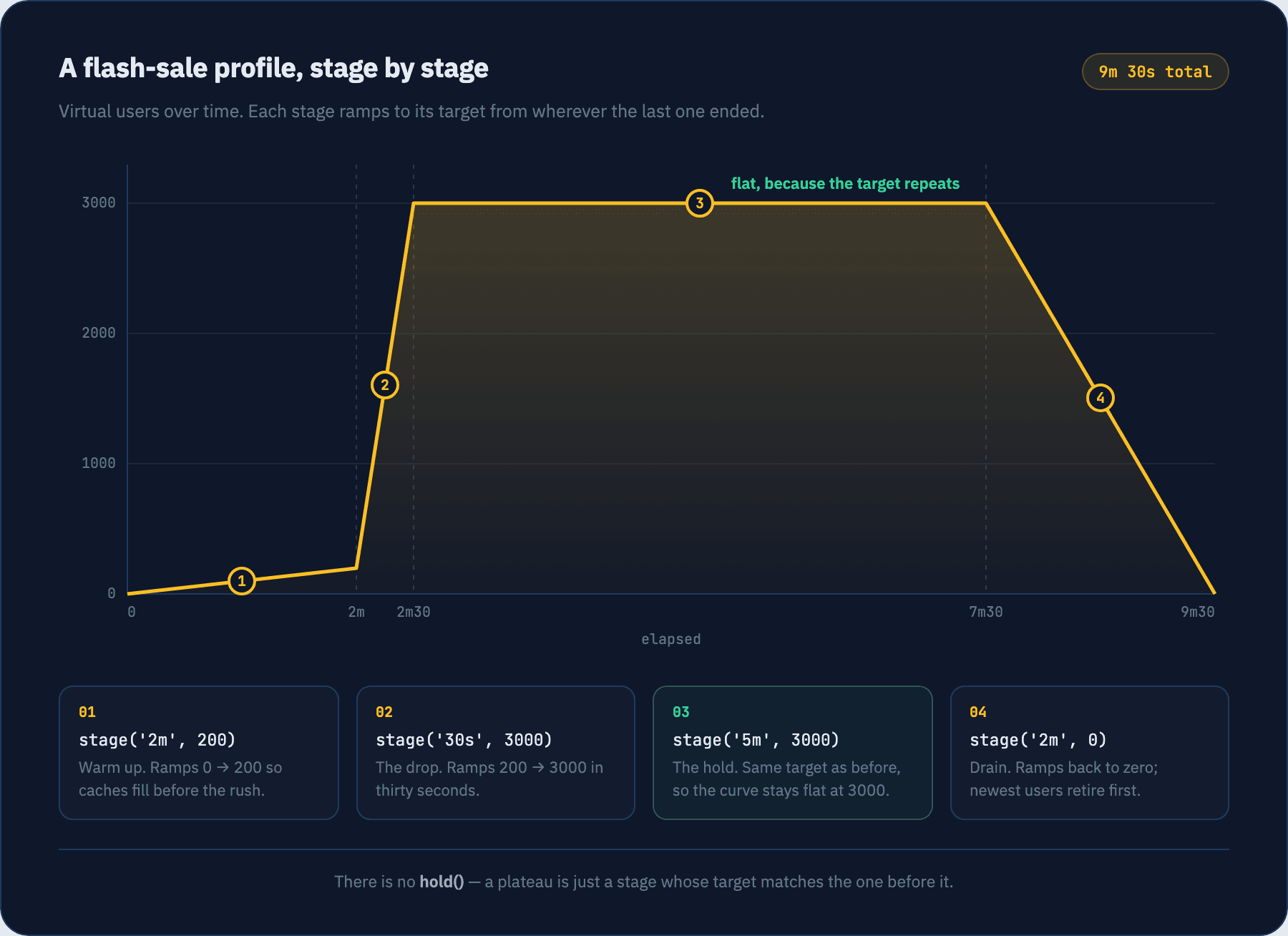
Virtual user count is re-evaluated once a second, so a spike shorter than a couple of seconds is not something this can resolve. On the way down the newest users are retired first, and a user added mid-ramp starts the scenario from its first step rather than joining halfway through a checkout.
- 01
Install the SDK
One Composer package, PHP 8.0 or newer with the json, curl and pcntl extensions. No agents to deploy and no controller to stand up.
terminalcomposer require volt-test/php-sdk --dev - 02
Add your shoppers
The scenario reads ${email} and ${password} from this CSV. Unique mode hands each run its own row, so size the file to at least your peak virtual users — it wraps and reuses rows once it runs out.
shoppers.csvemail,password ada@example.com,s3cret grace@example.com,s3cret alan@example.com,s3cret - 03
Rehearse the sale
Run it against staging first. Passing true to run() streams progress while the stages climb, so you can watch the point where response times start to bend.
terminalphp flash-sale.php
What comes back is the aggregate summary plus an error breakdown — and on a commerce run the breakdown is the interesting half.
Test Metrics Summary:
===================
Duration:     9m32.118s
Total Reqs:   428905
Success Rate: 97.44%
Req/sec:      749.83
Success Requests: 417930
Failed Requests: 10975

Response Time:
------------
Min:    22.804ms
Max:    9.812s
Avg:    412.077ms
Median: 188.336ms
P95:    1.904s
P99:    4.663s

Errors:
-------
[Checkout] validation failed: expected status code 201, got 429: 8402
[Add to cart] POST https://shop.example.com/api/v1/cart/add: http_503: 1913
[Checkout] request timeout after 30s: 660
Example output showing the shape of the summary. Your figures depend entirely on the storefront under test.
What you can model about a sale
Ecommerce performance testing comes down to shape — enough of it to make the traffic resemble a sale rather than a benchmark.
Staged spikes, not flat load
A sale is not a constant load. Describe the shape you expect — warm-up, drop, hold, drain — as a list of stages, and the engine moves virtual users along that curve, re-evaluating every second.
Weighted funnels
Most visitors never reach checkout. Run browse-only and browse-and-buy as separate weighted scenarios so the traffic mix resembles a real sale instead of an army of buyers.
A real cart per shopper
Turn on cookie handling and each virtual user keeps its own session for the length of its run, so its cart is genuinely its own. Sessions do not bleed between users.
A distinct customer per run
Feed a CSV of accounts and SKUs and hand rows out in unique mode, so shoppers are not all logging in as the same person or fighting over one product row.
Assertions that catch rejections
Attach an expected status to every step. Without one, a rejected checkout still counts as a successful request — see the section below, because this catches people out.
Traffic from several regions
In cloud runs, split your virtual users across regions by percentage so load arrives from more than one place at once, the way a sale actually arrives.
What it will not tell you
VoltTest checks each response on its own. It keeps no shared state across virtual users and does no cross-request consistency checking, so it cannot tell you that you oversold an item, double-charged a customer or lost an inventory decrement. It tells you the endpoint got slow, started failing, or stopped returning the status you asked for. Correctness under concurrency stays with your integration tests and your database constraints.
Four runs worth doing before a sale
In roughly this order, against staging, with time to act on what you find.
The full funnel, weighted
Browse-only and browse-and-buy side by side in production-like proportions. Endpoints that are comfortable in isolation often are not once they compete for the same database and cache.
The product everyone wants
Concentrate shoppers on one PDP and one add-to-cart route, the way a doorbuster works. Row locks, stock decrements and cache stampedes all surface here first.
Checkout under a spike
Checkout load testing is the run that matters most. Ramp hard into the checkout POST and watch where it bends — payment call latency, order-write contention, and whatever your gateway’s sandbox does when requests queue.
The long soak
Hold moderate load for an hour rather than blasting for five minutes. Queue backlogs, memory growth and connection leaks only show up over time.
Give the CSV more rows than your peak virtual users. Rows are handed out per scenario run, not per user, so a long rehearsal consumes far more than you would guess — and once the file is exhausted it wraps and several shoppers start sharing one account.
Keep reading
Load profiles
Constant load versus a staged ramp — the mechanics behind a spike.
Scenarios
Weights, think time and per-scenario data sources.
Steps
Every verb, header, assertion and extractor available on a step.
JSON API examples
Auth, CRUD and token extraction you can lift into a cart flow.
HTML form examples
CSRF and multi-step forms, for storefronts that post forms.
Cloud mode
Running the spike on managed infrastructure, across regions.
Common questions
Does it work with WooCommerce, Magento or Shopware?+
Can I test a headless or single-page storefront?+
Will it tell me if I oversold an item?+
Do I point it at my real payment provider?+
How many rows does my CSV need?+
How many virtual users can I run for free?+
Written by Islam A-Elwafa, founder of VoltTest and author of the PHP SDK, the Laravel package and the Go engine · Last updated August 2026
Ready to push your limits?
Start with 500 VUs, real cloud infrastructure, and real metrics — no credit card required. Upgrade only when you outgrow it.
Free forever — 500 VUs, 10-minute runs, no credit card