Laravel load testing tool
A Composer package and two Artisan commands. Scaffold a test from the routes your application already defines, run it against a real server, and get percentile latency back — without leaving PHP or adding a second toolchain to your repository.
It is a Laravel performance testing tool that lives inside the project: tests are ordinary classes in app/VoltTests, reviewed in the same pull request as the code they exercise.
500 VUs free, no credit card
Why Laravel needs its own load testing tool
A Laravel application that passes every unit, feature and browser test can still fall over at two hundred concurrent users, because none of those tests run concurrently. The failures are structural: an eager-load you forgot turns into a query storm, the connection pool empties before CPU looks busy, sessions contend in Redis, and the queue fills faster than workers drain it. You do not find any of that by clicking through the app.
A generic load generator can reproduce the traffic, but you spend the first day teaching it what Laravel already knows — where the routes are, how the session cookie works, where the CSRF token lives. A Laravel load testing tool starts from your route table and your config instead, so the first useful test is minutes away rather than an afternoon.
N+1 under concurrency
Invisible at one request per second, quadratic when the index route is hit two hundred times at once.
Connection pool exhaustion
Requests queue behind the pool limit long before CPU or memory look like the problem.
Session and cache contention
Every signed-in user touches the session store on every request. Alone it is nothing; together it is a bottleneck.
Queue backpressure
Jobs enqueue faster than workers drain them, and latency drifts upward over the length of the run.
For a deeper walkthrough of each failure mode and how to reproduce it, the full Laravel load testing guide covers the database, session, queue and PHP-FPM layers in detail.
What a Laravel test looks like
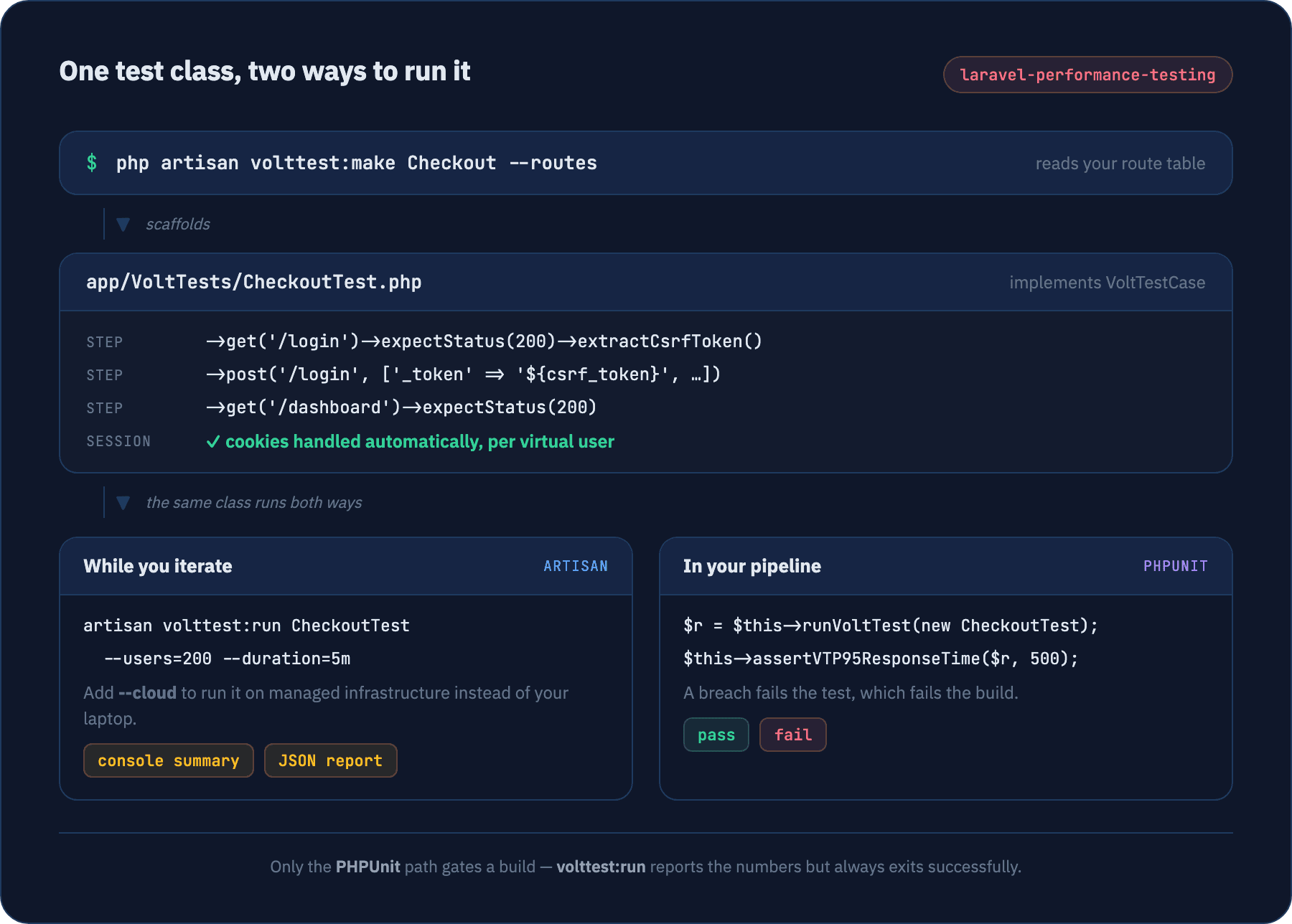
One class, one method. Paths are app-relative, bodies are PHP arrays, and each virtual user keeps its own session for the whole run — so the dashboard request at the end really is authenticated.
<?php

namespace App\VoltTests;

use VoltTest\Laravel\Contracts\VoltTestCase;
use VoltTest\Laravel\VoltTestManager;

class CheckoutTest implements VoltTestCase
{
    public function define(VoltTestManager $manager): void
    {
        $scenario = $manager->scenario('Checkout');

        // cookies are already handled — take the CSRF token
        $scenario->step('Login page')
            ->get('/login')
            ->expectStatus(200)
            ->extractCsrfToken();

        // array body, form-encoded for you
        $scenario->step('Sign in')
            ->post('/login', [
                '_token'    => '${csrf_token}',
                'email'    => '${email}',
                'password' => '${password}',
            ])
            ->expectStatus(302)
            ->thinkTime('2s');

        // still the same virtual user, still signed in
        $scenario->step('Dashboard')
            ->get('/dashboard')
            ->expectStatus(200);
    }
}
What is automatic, and what is one line
- Sessions and cookies are automatic. Every scenario enables cookie handling, so each virtual user holds its own Laravel session without you writing anything.
- CSRF is one line, not zero. Call
extractCsrfToken()on the step that fetched the form. When the scaffolder generates a web POST it writes the${csrf_token}placeholder but not the step that fills it — you add that once.
How to run it
Three commands from an existing Laravel application to a finished run.
- 01
Install the package
A dev dependency, nothing more. Laravel 11, 12 or 13 on PHP 8.2+, plus the pcntl extension — macOS, Linux and WSL are fine; native Windows is not.
terminalcomposer require volt-test/laravel-performance-testing --dev - 02
Scaffold a test
Writes app/VoltTests/CheckoutTest.php. Add --routes to generate a step per route from your real route table, and narrow it with --filter, --method, --auth or --select. Good to know: route discovery does not exclude package routes, so Telescope and Horizon show up unless you filter them out.
terminalphp artisan volttest:make Checkout --routes --filter=checkout/* - 03
Run it
The argument is the class name, not a file path. Add --cloud to run the identical class on managed infrastructure instead of your machine.
terminalphp artisan volttest:run CheckoutTest --users=200 --duration=5m
The summary prints to the console when the run finishes, and a JSON report lands in storage/volttest/reports so you can diff runs over time. Cloud runs report to the dashboard instead of writing either.
Test Results Summary:
=====================
Duration: 5m0.284s
Total Requests: 61240
Success Rate: 99.91%
Requests per Second: 204.13
Success Requests: 61185
Failed Requests: 55

Response Time:
-------------
Min: 38.417ms
Max: 1.902s
Avg: 214.663ms
Median: 168.204ms
P95: 588.331ms
P99: 1.147s
Example output showing the shape of the summary. Your figures depend entirely on the application under test.
What the Laravel package adds
Everything below is Laravel-specific — the work a general-purpose load generator would leave to you.
Two Artisan commands
volttest:make scaffolds a test class; volttest:run executes it. That is the whole surface area — no separate binary to install, no config server to stand up, no second repository for performance tests.
Scaffold from your real routes
Pass --routes and it reads your route table and writes a step per route, turning {id} segments into ${id} variables. Narrow it with --filter, --method, --auth, or pick interactively with --select.
Sessions handled for you
Every scenario enables cookie handling automatically, so each virtual user holds its own Laravel session for its whole run. CSRF is one call — extractCsrfToken() on the step that loaded the form.
Assertions that fail a build
Extend PerformanceTestCase and assert on the result: a p95 ceiling, a maximum error rate, a minimum sustained requests-per-second. A breach fails the PHPUnit test, which fails the pipeline.
Relative URLs and array bodies
Steps take app-relative paths, prefixed with your configured base URL, and accept PHP arrays as request bodies — JSON- or form-encoded depending on the headers. It reads like Laravel, not like a load-testing DSL.
Same file, local or cloud
Run it on your laptop while you iterate, then add --cloud to execute the identical class on managed infrastructure, optionally split across regions. Nothing in the test file changes.
Four places to point it first
If you only ever write four Laravel load tests, make them these.
Login and an authenticated journey
Load the form, take the CSRF token, post credentials, then walk the pages behind the auth middleware. This is where session-store contention and cache stampedes show up.
The route everyone hits
Your dashboard or index page, concentrated. An eager-load you forgot costs nothing at one request per second and saturates the connection pool at two hundred.
A write that dispatches jobs
Checkout, signup, upload — anything that queues work. Watch whether the queue drains as fast as it fills, or whether latency climbs quietly over the length of the run.
Mixed traffic with weights
Several scenarios running side by side in production-like proportions. Endpoints that are fast alone often are not once they compete for the same database and Redis.
Fail the build when p95 regresses
Extend PerformanceTestCase, run the same class you already wrote, and assert on the result. A breach fails the PHPUnit test, which fails the pipeline — no bespoke reporting step in between.
assertVTP95ResponseTime
ceiling on the tail users feel
assertVTErrorRate
maximum share of failed requests
assertVTMinimumRPS
floor on sustained throughput
assertVTSuccessful
minimum overall success rate
Use PHPUnit for gating, not the Artisan command. volttest:run prints its summary and exits successfully whatever the numbers say — it is built for iterating, not for failing a pipeline. See the full assertion reference.
Keep reading
Installation
Composer install, version requirements, publishing the config.
Quick start
Your first Laravel test in about five minutes.
Artisan commands
Every flag on volttest:make and volttest:run.
Web testing
CSRF tokens, sessions and multi-step form flows.
PHPUnit integration
PerformanceTestCase and running a test class from PHPUnit.
Performance assertions
The full assertVT* reference for gating a build.
Common questions
Do I have to restructure my Laravel app to use it?+
Which Laravel and PHP versions are supported?+
Is CSRF really handled automatically?+
Can I fail a CI build when performance regresses?+
Does it hit my real database?+
How many virtual users can I run for free?+
Written by Islam A-Elwafa, founder of VoltTest and author of the PHP SDK, the Laravel package and the Go engine · Last updated August 2026
Ready to push your limits?
Start with 500 VUs, real cloud infrastructure, and real metrics — no credit card required. Upgrade only when you outgrow it.
Free forever — 500 VUs, 10-minute runs, no credit card